1. Data Ingestion & Feature Engineering
1.1 Relational Schema & Source Systems
Tables
There are four main sources of data, either in PostgreSQL or Open Data Kit (ODK)
Admission (287 columns)
Outpatient therapeutic program (OTP) visit (209)
Inpatient therapeutic program (ITP) admission and discharge (113)
Outcome status (22 columns)
At the time of development, there were 29,000 patients. 5,000 were actively in treatment so the models were built on the history of 24,000 and then used to infer on the 5,000 active. About 12,500 (52%) of these 24,000 patients also have ITP history. There were 182,000 visits, averaging 7 visits per patient.
Open Data Kit
Taimaka staff use ODK to capture patient data in the field. The ODK data is then uploaded to a server and then processed into PostgreSQL tables. ODK data was used for the 46 weekly visit columns and five admission columns that had not been processed into PostgreSQL tables.
1.2 Feature Extraction & Temporal Dynamics
Each form contains questions like “Does the child have a cough?” or “Has the child received their birth series of vaccines?” The data from these forms was transformed into a row per patient so that each column represents repeated measurements and form answers over time. To improve predictive performance, we engineered features likely to be predictive of deterioration or the event in question.
Each week Taimaka recorded three anthropometrics for a patient: weight, height, mid-upper arm circumference (MUAC) and derived z-scores for weight for height (WHZ), weight for age and height for age. Useful summary statistics were added for these 6, such as the slope of the trend line over the patient’s visit history to represent the patient’s recovery rate; the r-squared of the trend (to represent its linearity), the rate of change per day and the difference between last and first measurements to represent the total growth of the patient.
Duplicate or collinear columns were dropped. In total, engineering these features for each visit for each patient resulted in a dataset of about 1,439 columns, varying slightly by target event being predicted.
For each event of interest a time series version of this dataset was made that appended the most recent three visits to the admission data. (Figure 1.) If the event had occurred, the series was the three visits immediately before the event. For patients without the event, it was simply the most recent three visits.
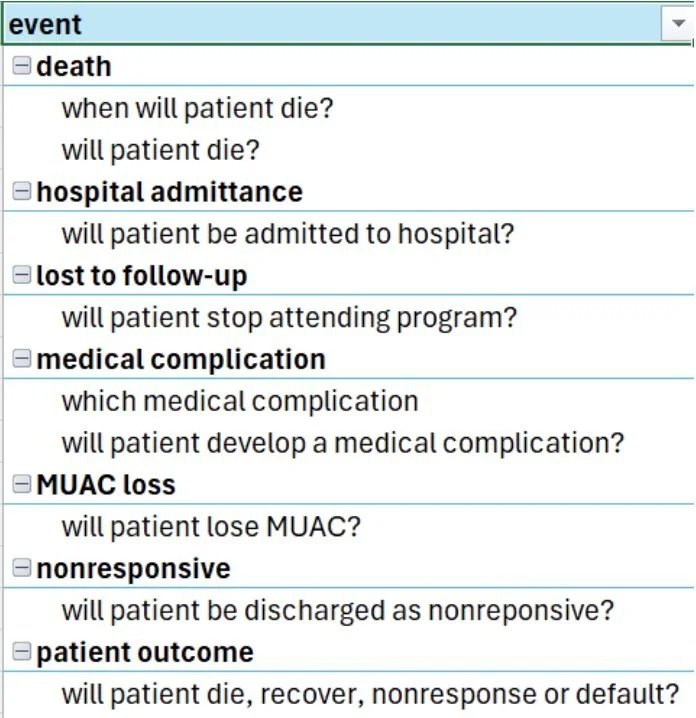
Figure 1 - Events
Some columns were a result of the event, not the cause. For example, patient notes were made upon or right before deterioration. Those were considered target leakage. In other words, it was caused by the deterioration rather than causing the event. We only wanted predictive features, not columns caused by the event. In partnership with the subject matter experts, about 150 columns were identified with this problem and were excluded as candidate predictors, leaving about 1,289 columns.
1.3 Censoring & Clinical Program Discharge Trajectories
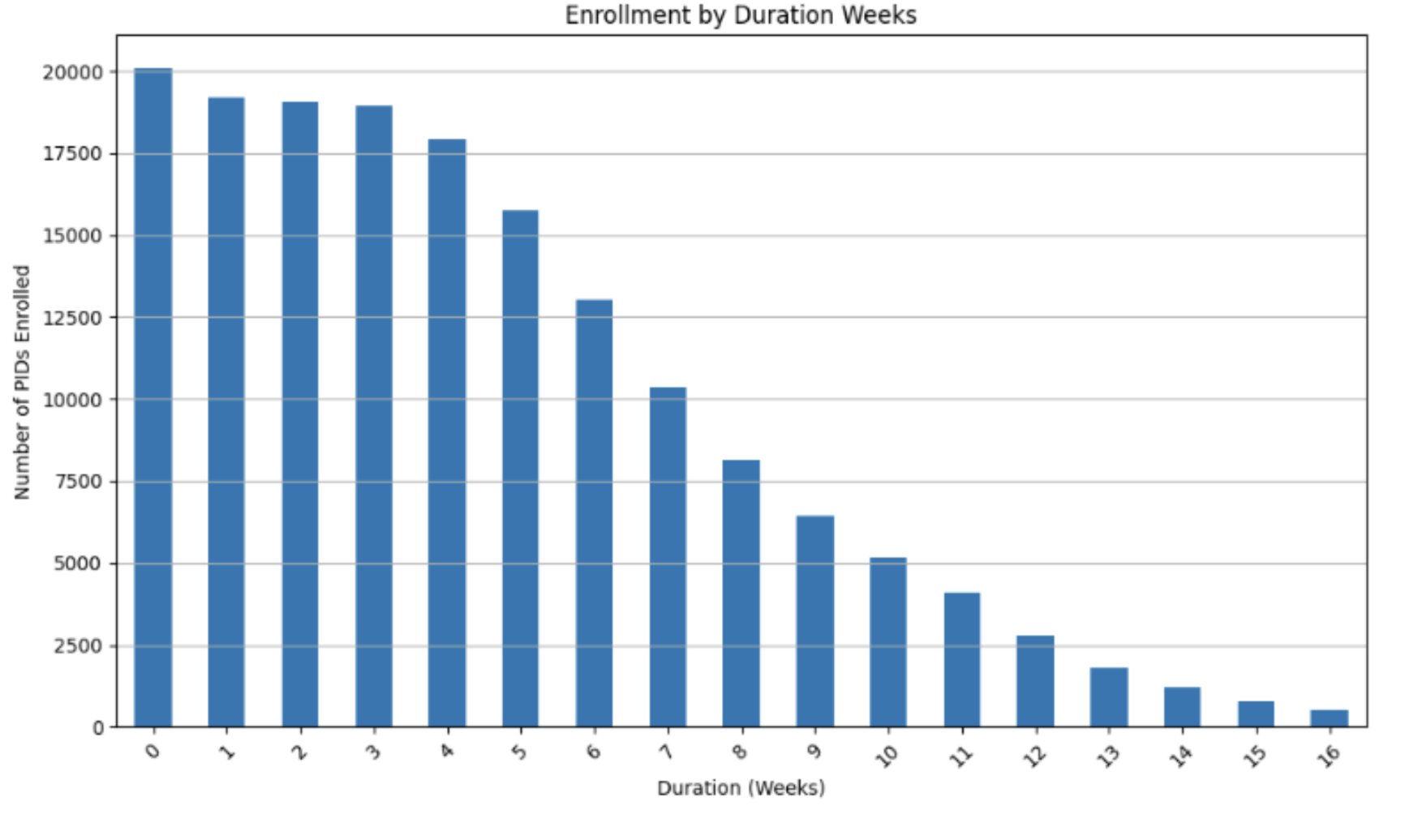
Figure 2 - Patient enrollment by length of stay
The data is a heavily right-censored time series for each patient. The series starts with admission data, then weekly OTP follow-up visits. For the 52% of the patients that are admitted into the hospital (ITP), the ITP discharge anthropometrics also become part of the data.
A patient is treated for at least 3 weeks. (Figure 2.) After that, they can be discharged as recovered if MUAC > 12.5 cm, which is considered no longer malnourished.
Starting at 11 weeks they can be discharged as non-responsive if MUAC fails to reach 12.5. (Figure 3.) After discharge, the patient’s outcome is unobserved, which is what makes the data censored for events like death.
Besides nonresponsive and recovered, the other discharge statuses are death during the program and default (patient stopped attending before program completion). (Figure 4.)
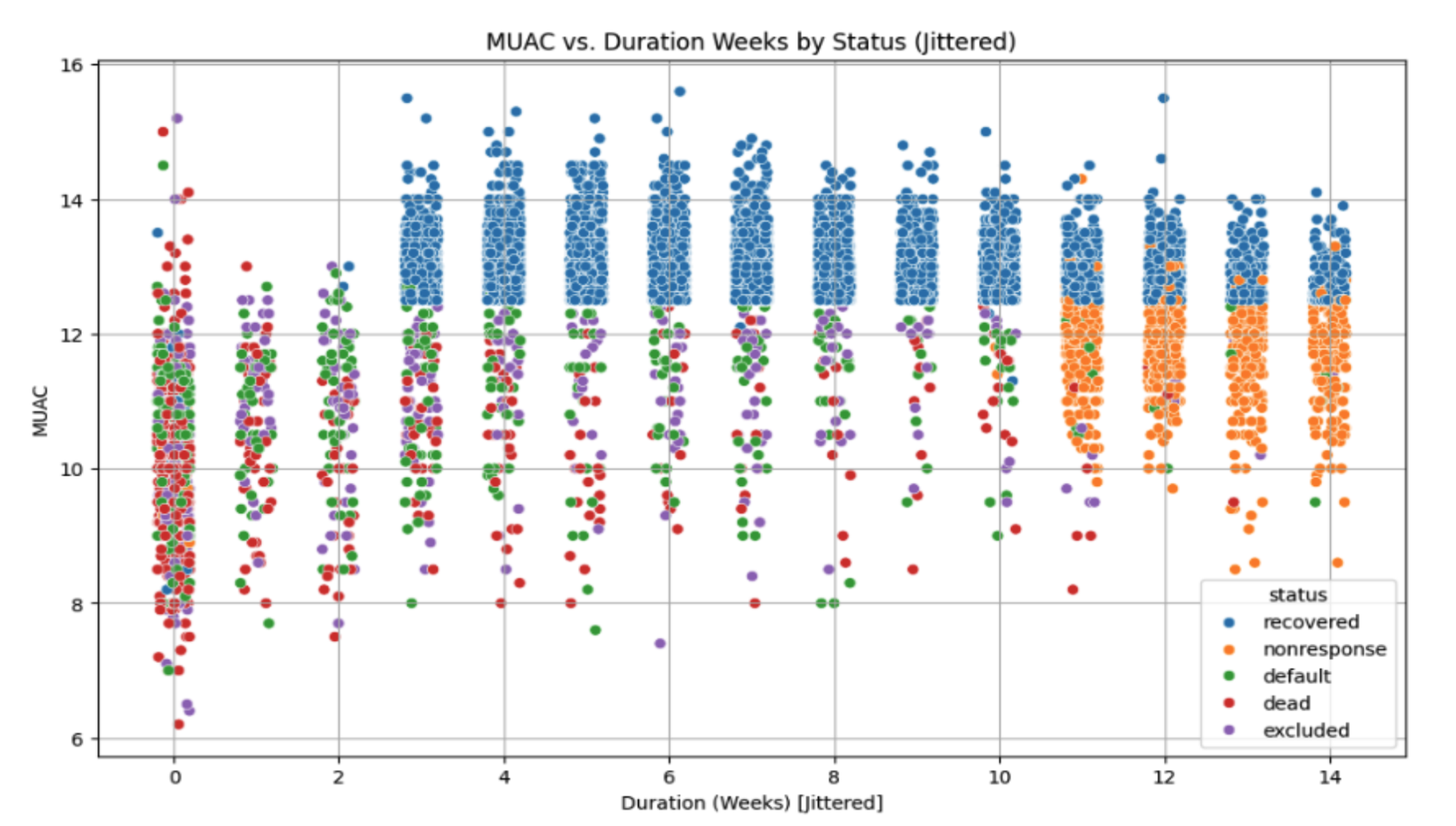
Figure 3 - Final MUAC by length of stay and discharge status
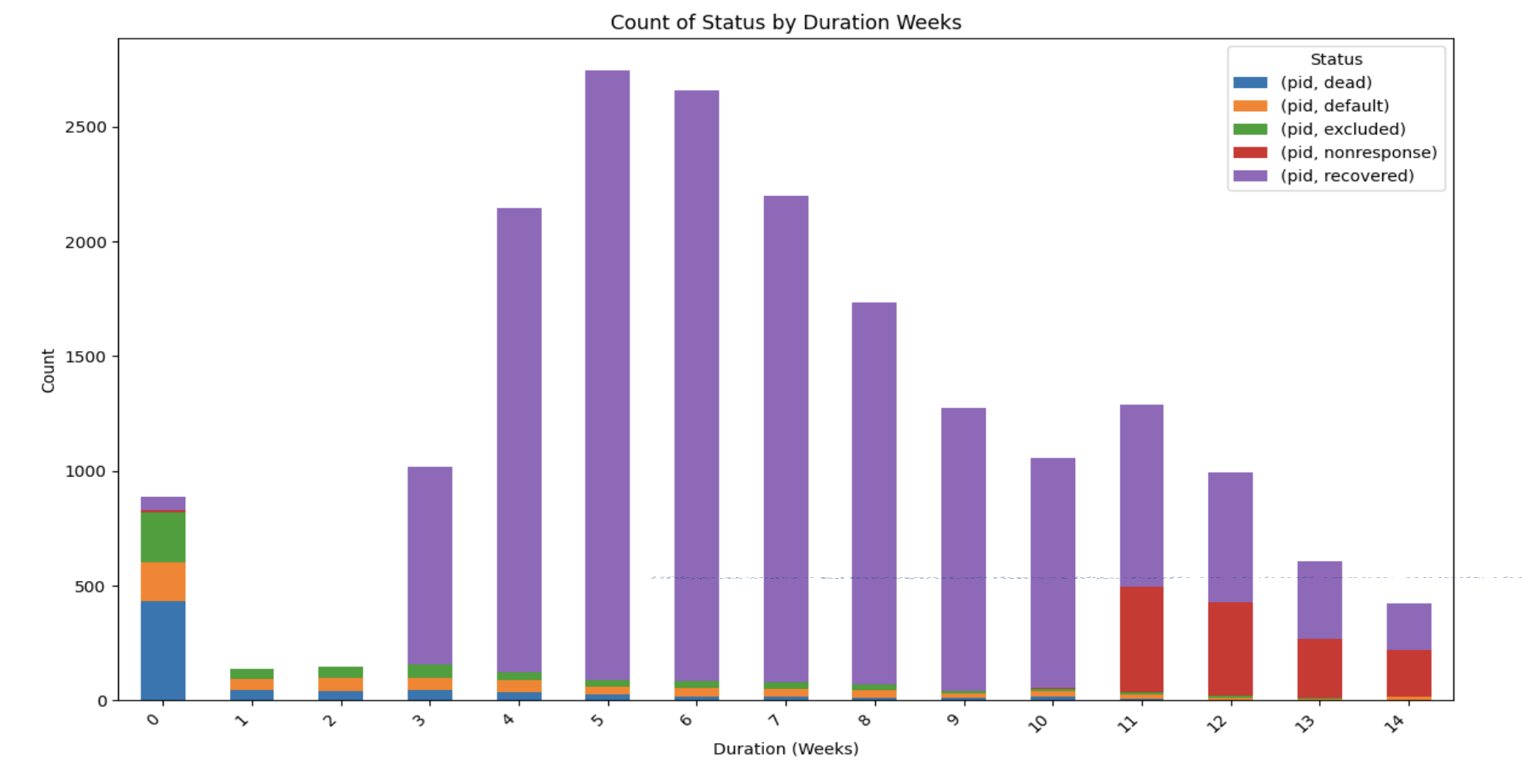
Figure 4 - Discharge reason by length of stay in program
In addition to recovery and nonresponse, the mortality outcome classification rate was biased by duration and MUAC due to this right-censoring. 60% of deaths occur before the first visit and 80% before week 4. (Figure 5.)
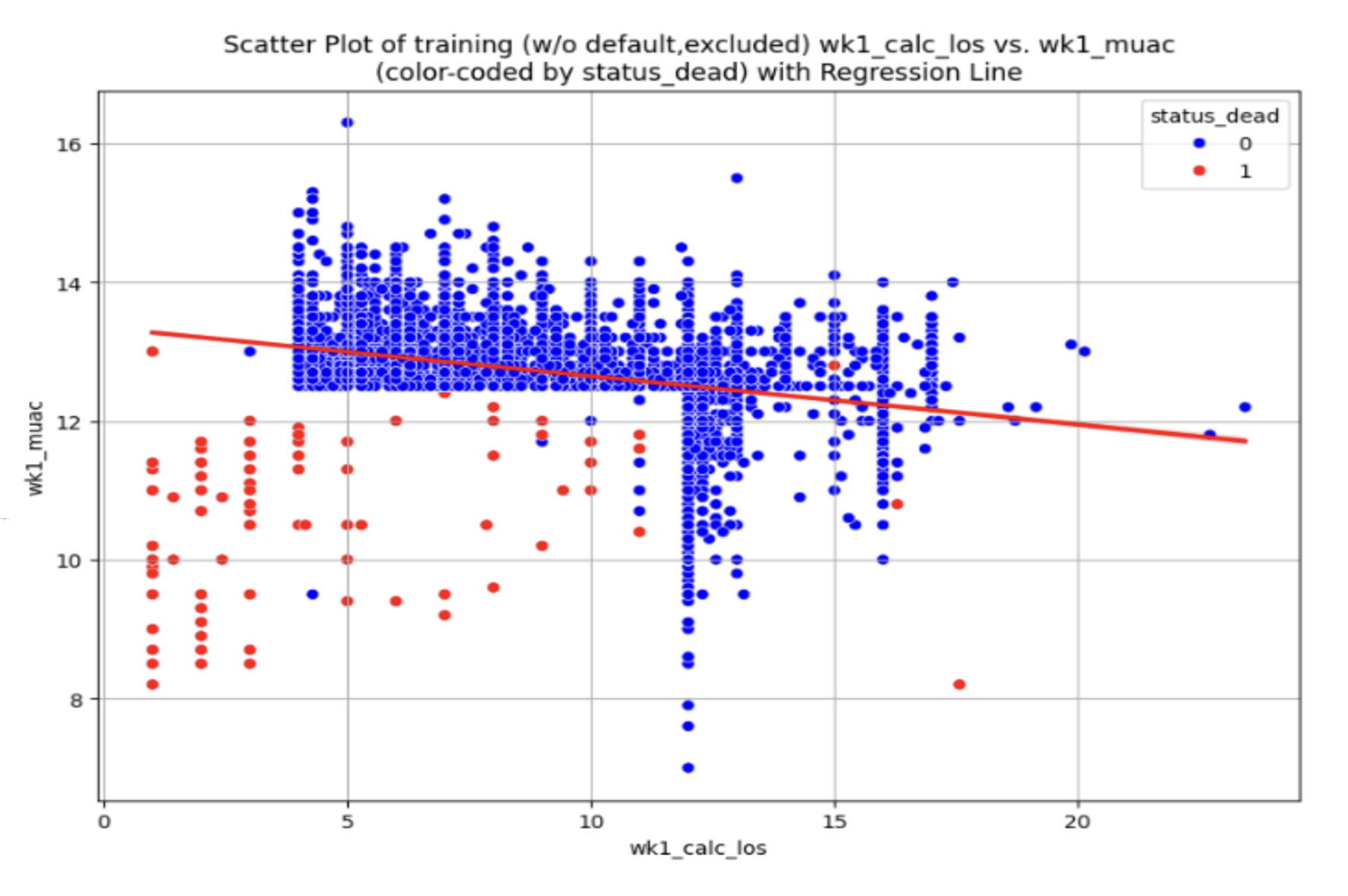
Figure 5 - Scatter plot of length of stay and MUAC at week 1, color-coded by mortality status
2. Modeling Methodology
2.1 Addressing Right-Censored Data via Survival Stacking
The biggest problem to solve was how to classify using censored data. Classification using censored data produces heavily biased models that infer incorrectly. Typically, the solution would be survival analysis as this handles censored data naturally. However, survival uses specialized software. This software is difficult to adapt to off-the-shelf classification and Automated Machine Learning, AutoGluon, in particular.
Instead, we used a technique called survival stacking. Survival stacking is a data science technique that transforms time-to-event (survival analysis) data into a binary classification problem. It works by reshaping data into a stacked tabular format, creating a binary outcome for each time point, which allows analysts to use standard machine learning tools like logistic regression, random forests, and neural networks. The original survival stacking paper was written by Erin Craig, Chenyang Zhong, and Robert Tibshirani of Columbia and Stanford universities. They prove mathematically that survival stacking with logistic regression is approximately equivalent to the Cox proportional hazards model.
Survival stacking enabled us to do conventional classification to predict survival time. We could repurpose the code we had written for feature selection, training, explanation by simply stacking the data first.
We looked at the 66 deaths that occurred after the stacked survival model was trained. Model performance was evaluated on both:
precision (the proportion of death predictions that are actually correct) and
F1 (the harmonic mean of precision and recall, where recall is the proportion of actual positives identified correctly).
We compared the performance of the stacked survival model to the traditional death classification model. A death prediction was defined by the cumulative death hazard at 90 days and the chance of leaving the program due to death, respectively. We back-tested death predictions on patients that the models had not seen in training.
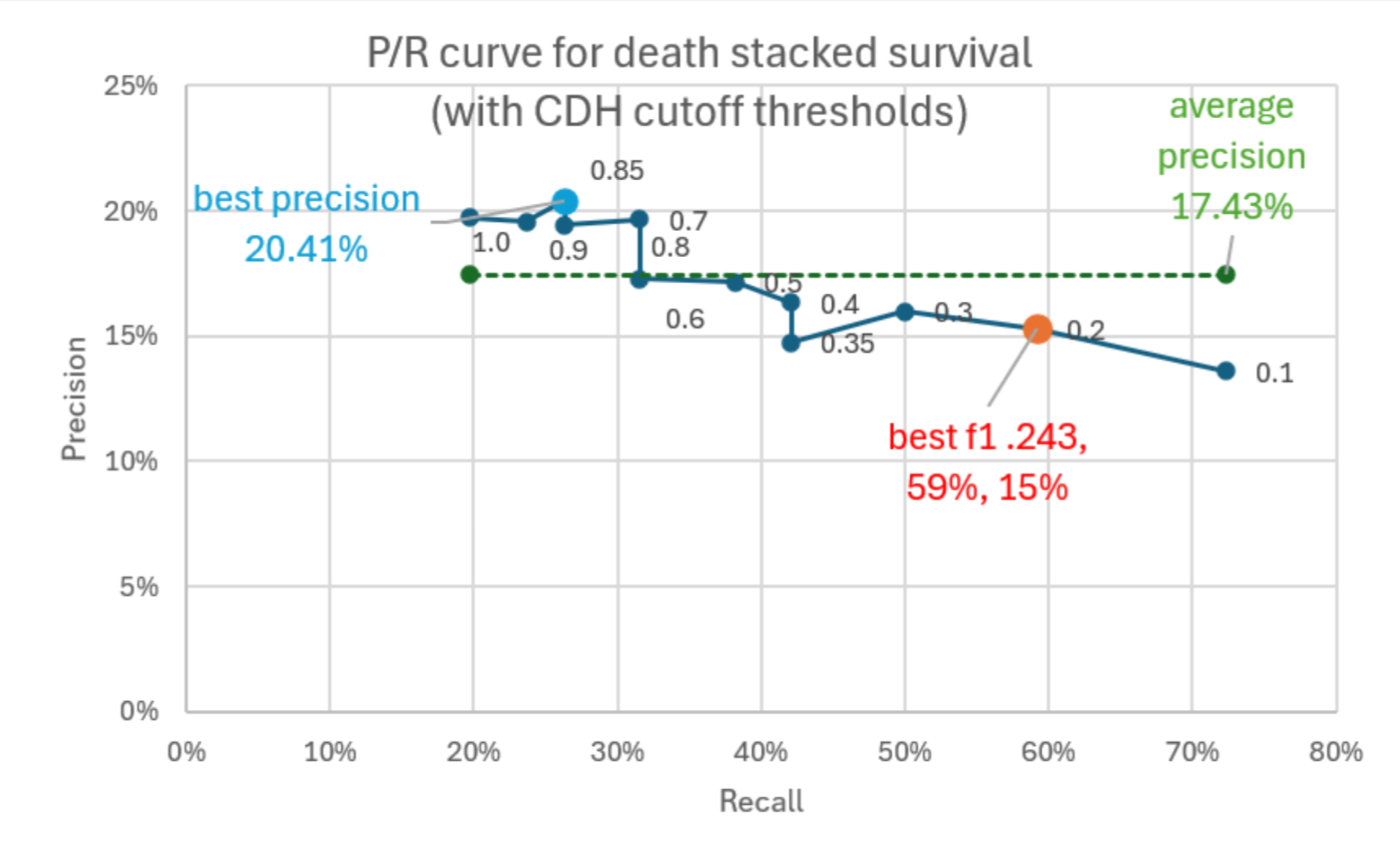
Figure 6 - Precision recall by cutoff, stacked survival
After, we used precision recall curves to evaluate the 2 metrics. A precision-recall curve is a graph that shows the trade-off between precision and recall for a binary classification model across different classification thresholds. The precision/recall curves at declining hazard or probability thresholds for the two approaches, respectively:
Figures 6 and 7 illustrate how the stacked survival approach improved:
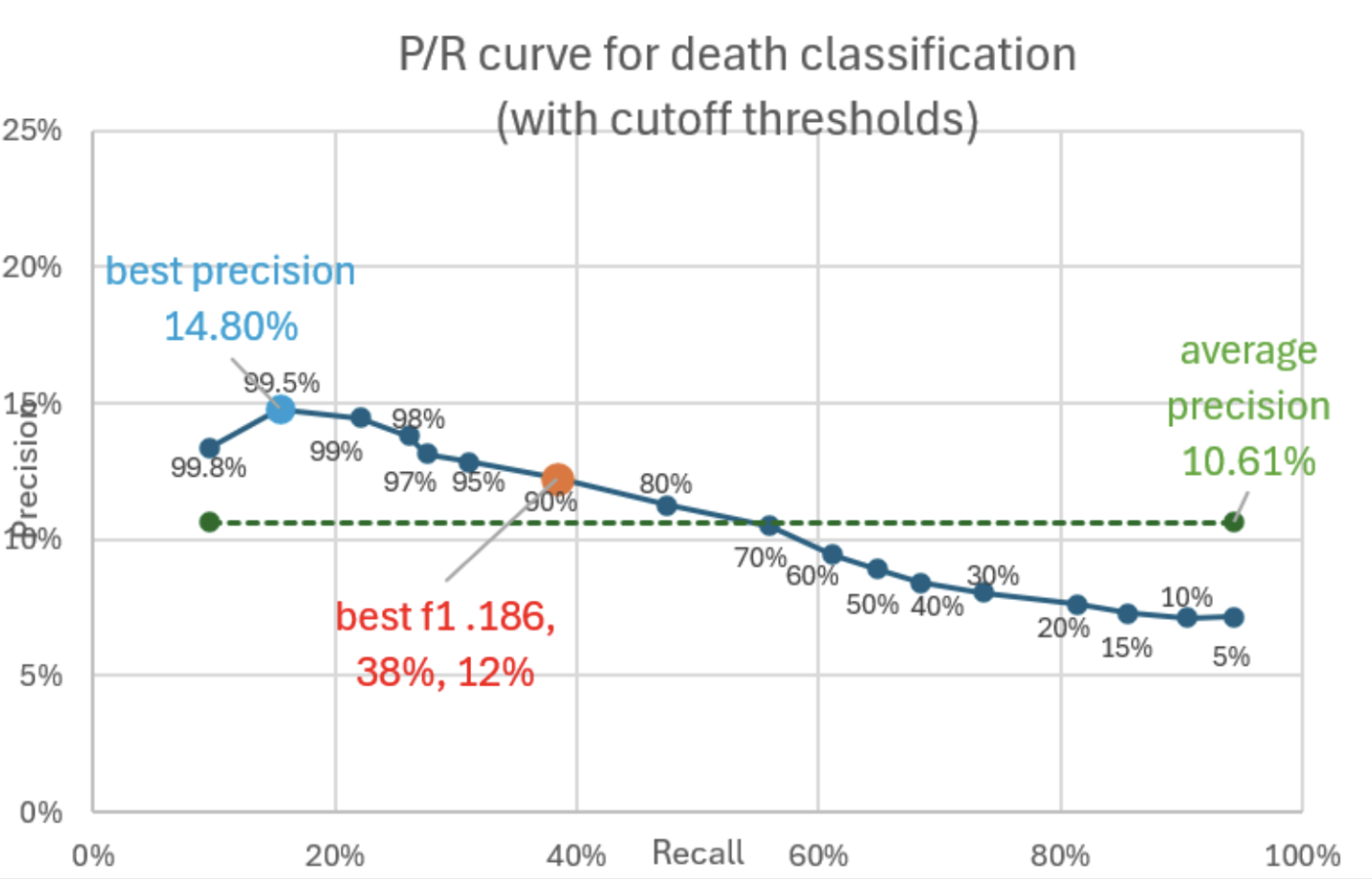
Precision recall by cutoff, classification
Average precision from 10.6% to 17.4%
Best precision from 14.8% to 20.4%
Best F1 from 0.186 to 0.243
Since program death is a rare event (3% of children admitted to the program die during treatment), predicting death is inherently a difficult ML task. Although still a long way from a powerful model, survival analysis using the survstack (https://github.com/kaboroevich/survstack) Python stacked survival library does meaningfully better than classification. It handles censoring better than classification models.
We used survival stacking only for death as it was the most censored event. We chose cumulative hazard at 90 days as the metric to publish. It was also published as the probability of survival at 90 days, which is a mathematical transformation of cumulative hazard.
2.2 Classification Modeling Framework
The field needed to use classification model predictions for treatment intervention, so models had to be both accurate and easily understood. With so many features, efficient and effective feature engineering, selection, and reduction was paramount. Recursive feature selection from scikit-learn is a common approach but can be time consuming. We needed a way to quickly iterate training and scoring models with various combinations of features.
Machine learning
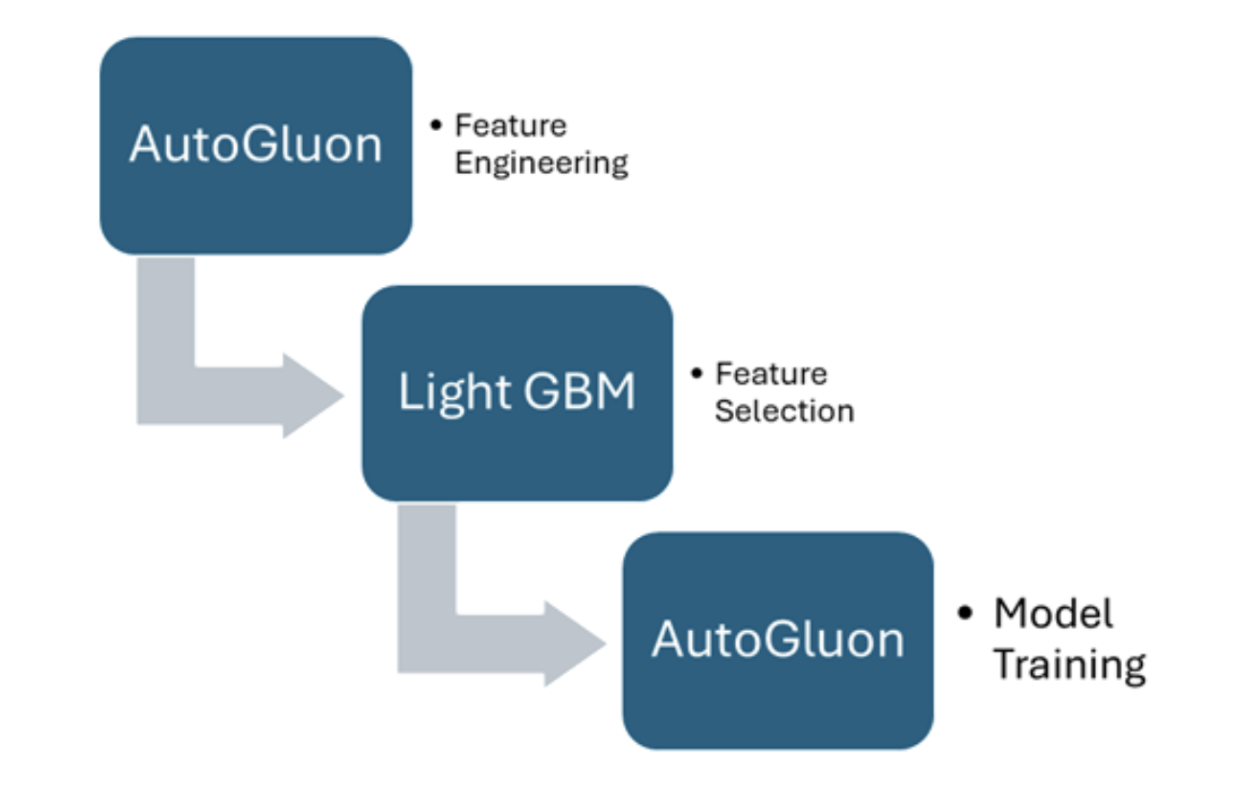
Figure 8 - AutoML steps
We selected AutoGluon as our AutoML implementation. It’s well-known to the Kaggle machine learning community and has been used in winning Kaggle competitions such as NeurIPS Open Polymer Prediction 2025 Competition, 2024 Kaggle AutoML Grand Prix and Kaggle Playground Series (S4E8) Mushrooms Binary Prediction.
Running AutoGluon can be very easy. The analyst can simply specify the model quality and how long the training should run and AutoGluon can take care of the rest.
2.3 Feature Selection Pipeline (AutoGluon + LightGBM)
For our feature selection process, we combined the robust automatic feature engineering of AutoGluon with the fast model fitting speed of Light Gradient Boosting Machine (LightGBM). Speed enables training iterations.
In step 1 we used AutoGluon feature engineering. In AutoGluon, feature engineering is a fully automated process that transforms raw, messy data into a clean, numerical format ready for machine learning. It can run separately from model fitting. It enabled:
Data Type Detection and Handling. It automatically infers the data types of columns (e.g., numerical, categorical, text, datetime) and applies appropriate transformations.
Missing Value Imputation. It handles missing values without requiring explicit imputation steps from the user.
Categorical Feature Encoding. Categorical features are automatically encoded, typically into integers, for use by downstream models.
Text Feature Engineering. For text columns, it can extract n-gram features (e.g., individual words or short phrases) and generate additional numerical features like word counts, character counts, and proportion of uppercase characters.
Datetime Feature Extraction. Datetime columns can be processed to extract features such as day of the week, month, year, and other relevant temporal information.
Redundancy Handling. It identifies and removes redundant columns (e.g., columns with only one unique value or duplicate columns) to streamline the dataset.
AutoGluon is not fully scikit-learn compatible so handy routines like recursive feature elimination RFE can’t be used. Also, RFE is slow for wide (i.e., many columns) datasets and requires a multi-step approach with decreasing step sizes. Using the experimental AutoGluon force pruning feature didn’t appear to work either.
We then took the output of AutoGluon’s feature engineering and fed that into LightGBM for the next step.
Step 2: The conventional guidance is to perform feature selection before AutoGluon training. Therefore, the data with the augmented features from step 1 was passed to LightGBM for fast feature selection. The first LightGBM model fit reduced the columns by over half. The second pass reduced those to the best 275 with very little score reduction. Then we took the best 20 from the 275 and iterated 20 times, taking the worst performing feature away at each iteration and recording the score of the 20% hold-out dataset at each iteration. It is not an exhaustive search as a naïve grid search of even all the 13-feature combinations of the 20 would be 77,520 training iterations. Recursive brute force wouldn’t scale. The 20 single-step eliminations ran fast and served our purpose of finding a model that generalizes well with as few features as possible. Permutation feature importance is mathematically valid but too slow.
For this model to be useful for improving patient outcomes and reducing treatment cost, we wanted to balance predictive performance with a low number of predictors that are easily interpreted by users in the field. We wanted to have good good precision and recall but with as few features as possible.
Model predictive performance tended to degrade only when the feature count dropped into single digits. All metrics remained good until then. (Figure 9.)
Average precision across selection thresholds, F-score and binary log loss scores were ranked. We summed the ranks and took the model with the best summed rank. The AIC (Akaike information criterion) metric was also calculated because AIC encourages the use of simpler models. It balances a model's goodness-of-fit (how well it fits the data) with its complexity (number of parameters). As shown in figure 9, the selected model usually had a very good AIC too.
We could have gone further with cross-validation and other techniques, but this fast and simple approach met our needs for predictive and explainable models. The automatic feature engineering and fast feature reduction enabled analysts without machine learning specialization to train models. Note that the 20% hold-out wasn’t a final untouched test set.
Principal component analysis was used for dimension reduction where it made sense to do so. For example, the number of people who lived in a household and the number who slept there were reduced into one feature.
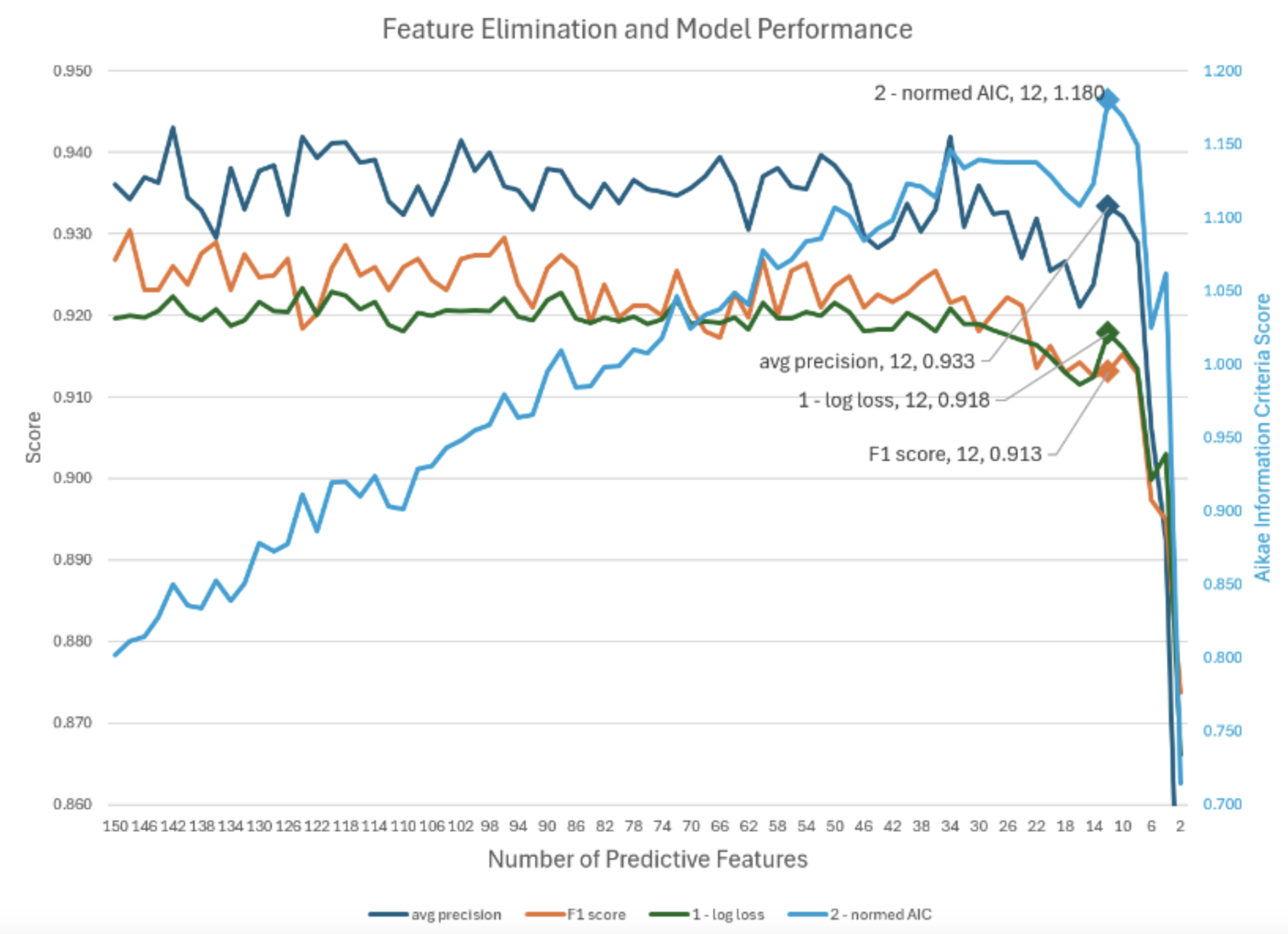
Figure 9 - Feature reduction and model performance
Of the approximately 1,289 candidate features the first training iteration would typically discard about 400 features as useless as they carry no predictive signal. Subsequent iterations would leave around another 876 features unused by any of the models. The best iteration averaged around 13 features for a typical model.
The model was limited to a maximum of 20 features to keep them easily explainable. Some features, like projected MUAC at the next visit, were used by 31 models. 149 features were used across the 48 models.
Step 3: AutoGluon allows 6 levels of quality presets, from medium to best. The corresponding fit time increases 16-fold as well. Given our data, we found the preset of best generalized no better than the preset of medium which trained in 5 minutes.
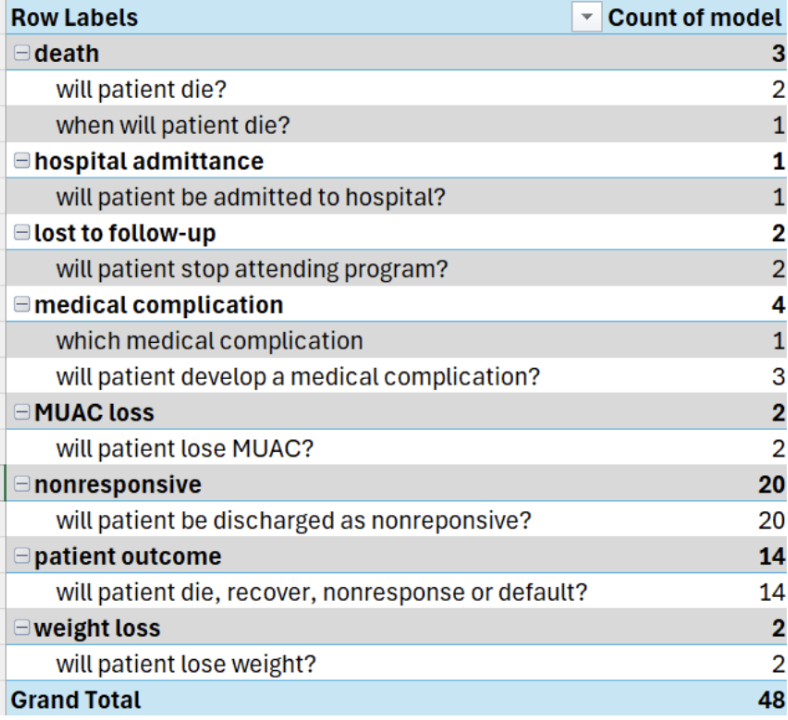
Figure 10 - Number of models per event based on stratification cohorts
2.4 Training Environment
We developed nine Python Jupyter notebooks, two for death and one for each of the other 7 events. They could be trained either in the cloud Google Colab or on a local Python instance via a simple runtime switch. For some events we trained models on stratified data based on length of stay and whether or not the patient had been in ITP. (Figure 10.)
2.5 Precision-Recall Optimization & Clinical Threshold Tuning
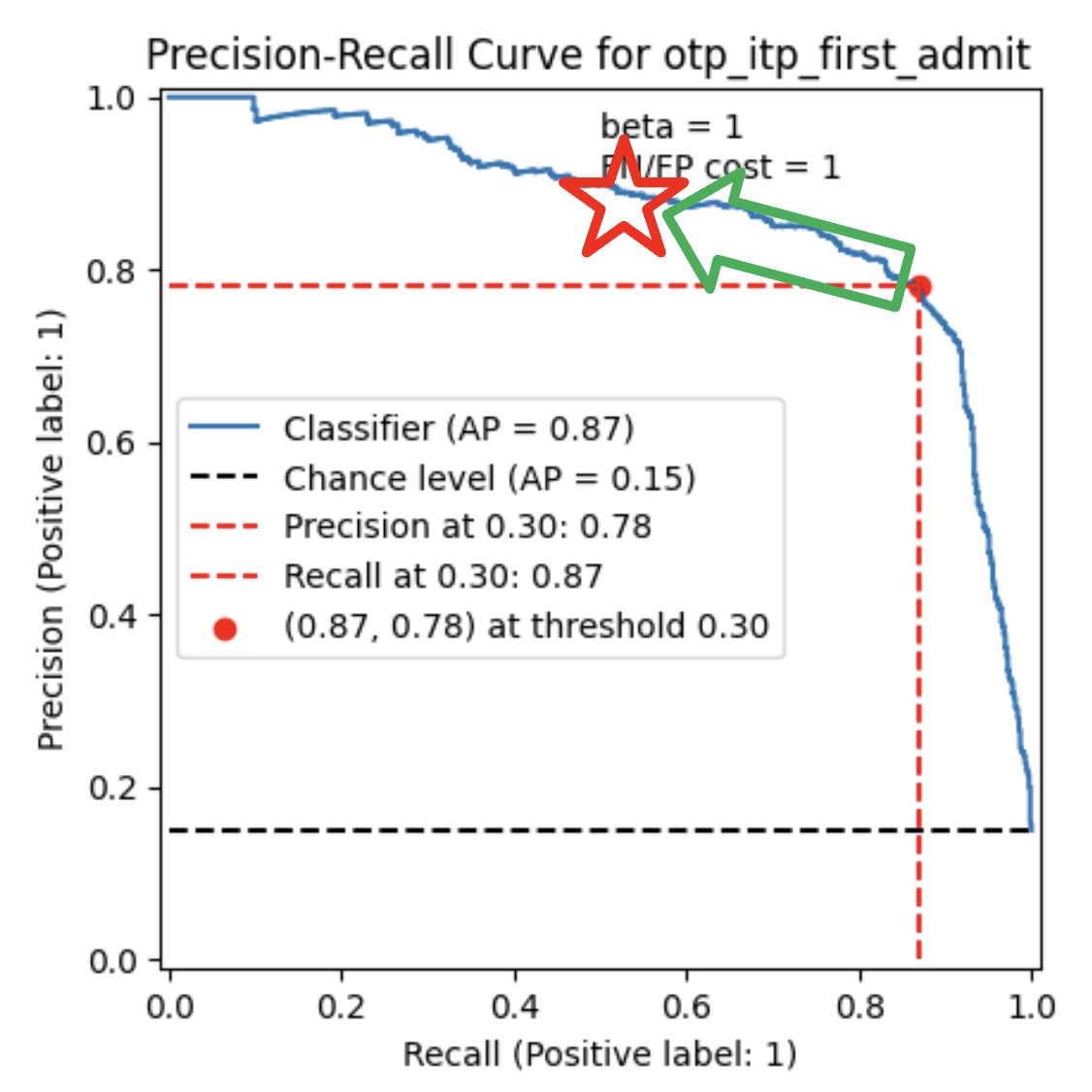
Figure 11 - Precision-recall curve cutoff choice
We optimized for average precision so the threshold could be set at inference time, then deliberately chose a high-precision threshold because ITP beds and mobilizers are limited and staff trust in the flags mattered. Therefore precision was increased at the expense of recall, sliding the red dot to the red star at the dot’s upper left. This helped maintain field staff’s trust in the alerts. (Figure 11.)
2.6 Explainable AI (XAI) for Clinical Decision Support
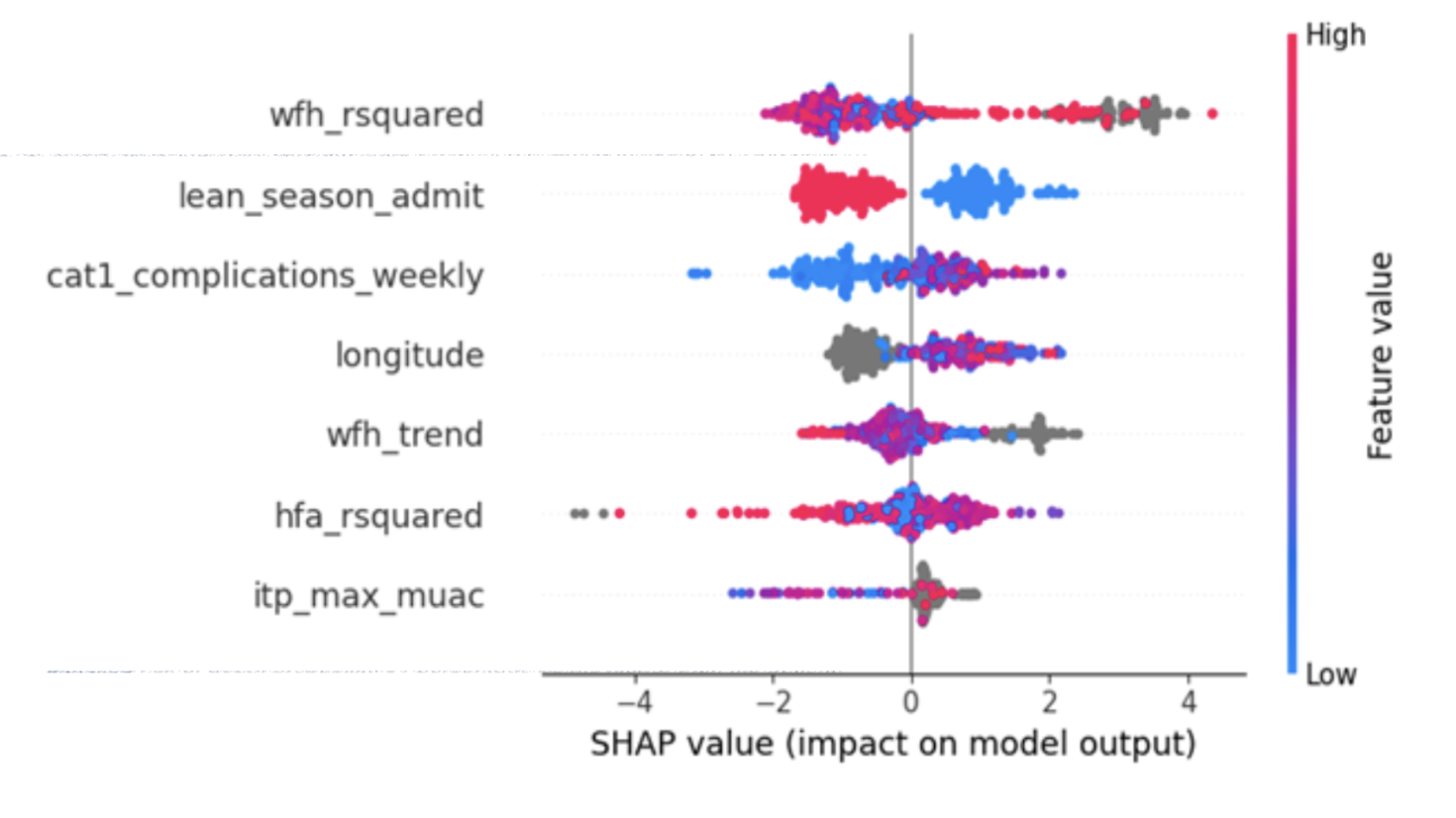
Figure 12 - SHAP summary (“beeswarm”) plot of model feature importance
We used SHapley Additive exPlanations, SHAP, for model and patient visualization. SHAP values provide visual explanations of the relative importance of features as well as how they affect the model outputs. We also used the SHAP waterfall diagram to show which patient features contributed to a specific patient’s morbidity/mortality classification. It explains a mortality classification for a particular patient. (Figure 12.)
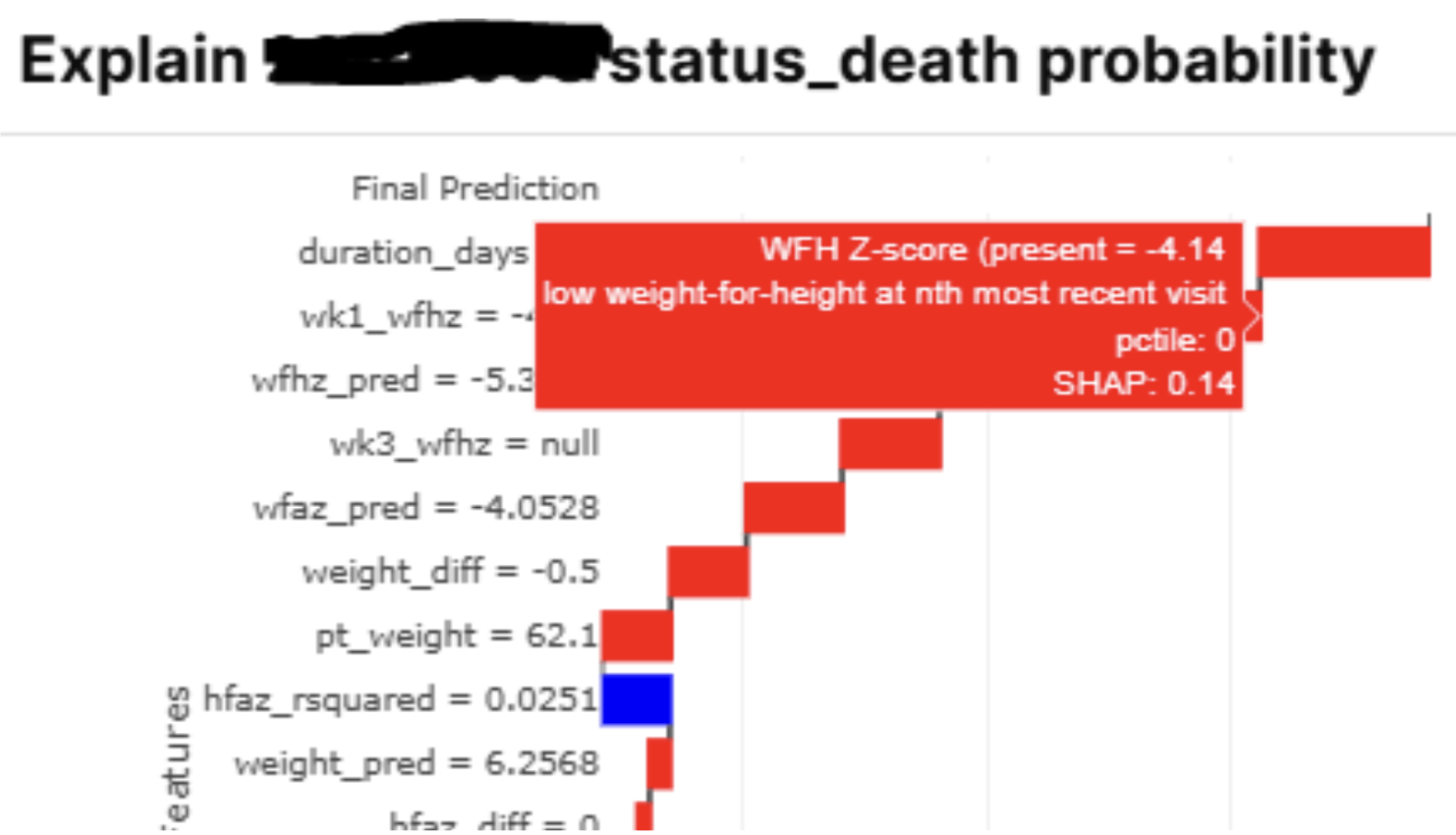
Figure 13 - SHAP waterfall plot of feature importance for a specific patient
We took the SHAP values and wrapped them in a JSON database column and sent that to the browser to render the waterfall bar chart in the browser. That gave us the opportunity to enhance the waterfall display’s column values with the column descriptions too. A JavaScript mouseover event displays explanatory text (in red, figure 13) when the dashboard user hovers the mouse over a column name. This aids the user in determining what the column means.
2.7 Anthropometric Trajectory Forecasting (ARIMA)
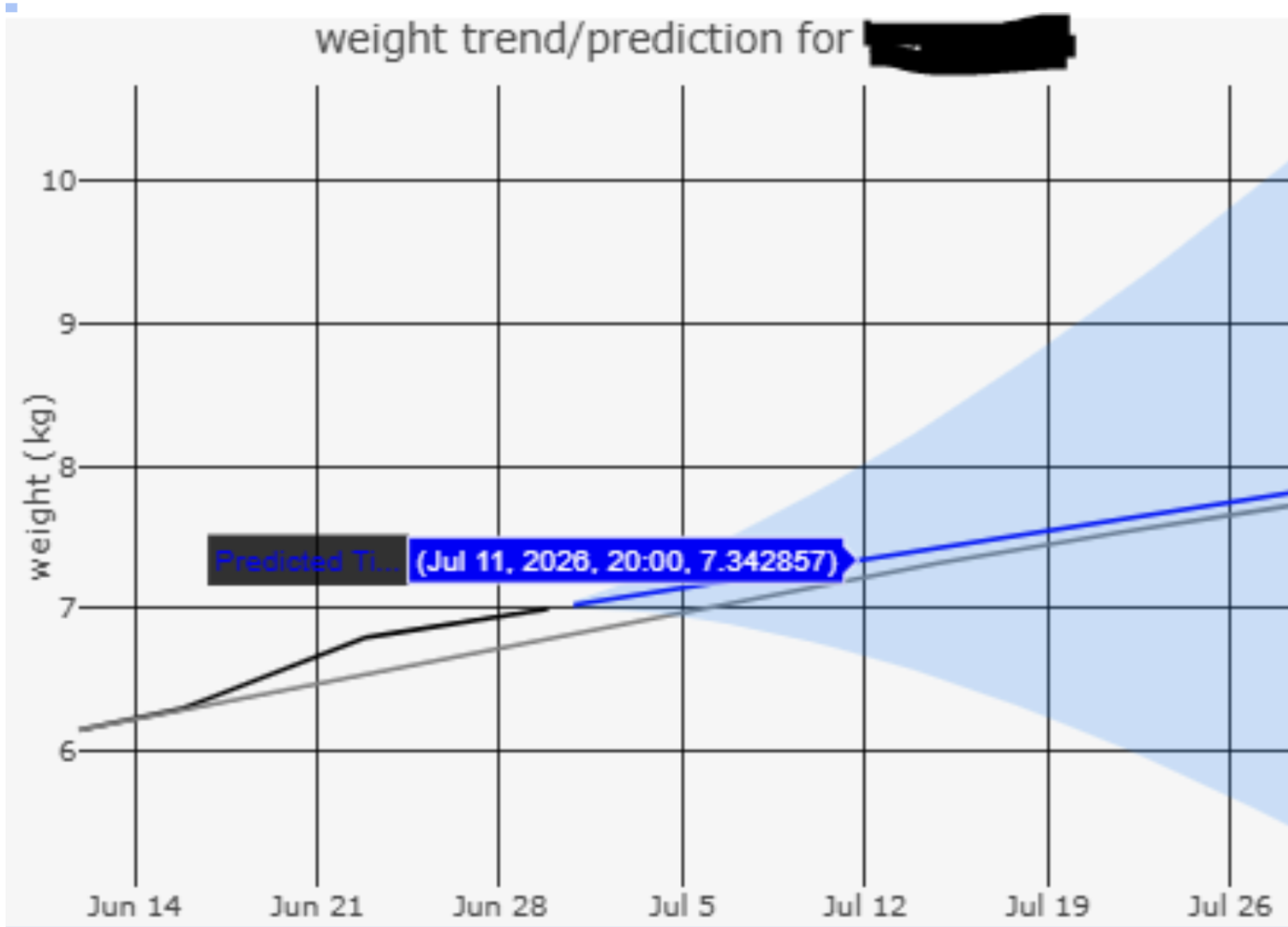
Figure 14 - Weight prediction for the next 30 days with 90% confidence range in blue and hover text displaying for July 11, 2026
There were 6 types of anthropometric measurements taken or computed from each weekly visit. For each of these types, we used ARIMA (Autoregressive Integrated Moving Average) to project a patient’s anthropometric trajectory 30 days into the future. The data was created in Python and then exported to a JSON database column. Then we used Retool Plotly to create an interactive display. (Figure 14.)
2.8 Parametric Survival Analysis (Weibull AFT)
Another key prediction, in addition to “chance of” was “when.” It is important to know "when" on top of "chance of" so that healthcare providers with constrained resources can intervene in a timely manner on the most critical patients.
We used the popular Python lifelines library to predict survival. In this case, survival would be interpreted as days until the adverse health event occurs (e.g., death).
We used the Weibull accelerated failure time (AFT) model as it best parametrized and generalized to the 5 events where time-to-event made sense to model. For example, death rates significantly decreased over time, typical of infant mortality. (Newly admitted patients start off with an even higher death rate as Taimaka identifies and treats severe cases of malnutrition.)
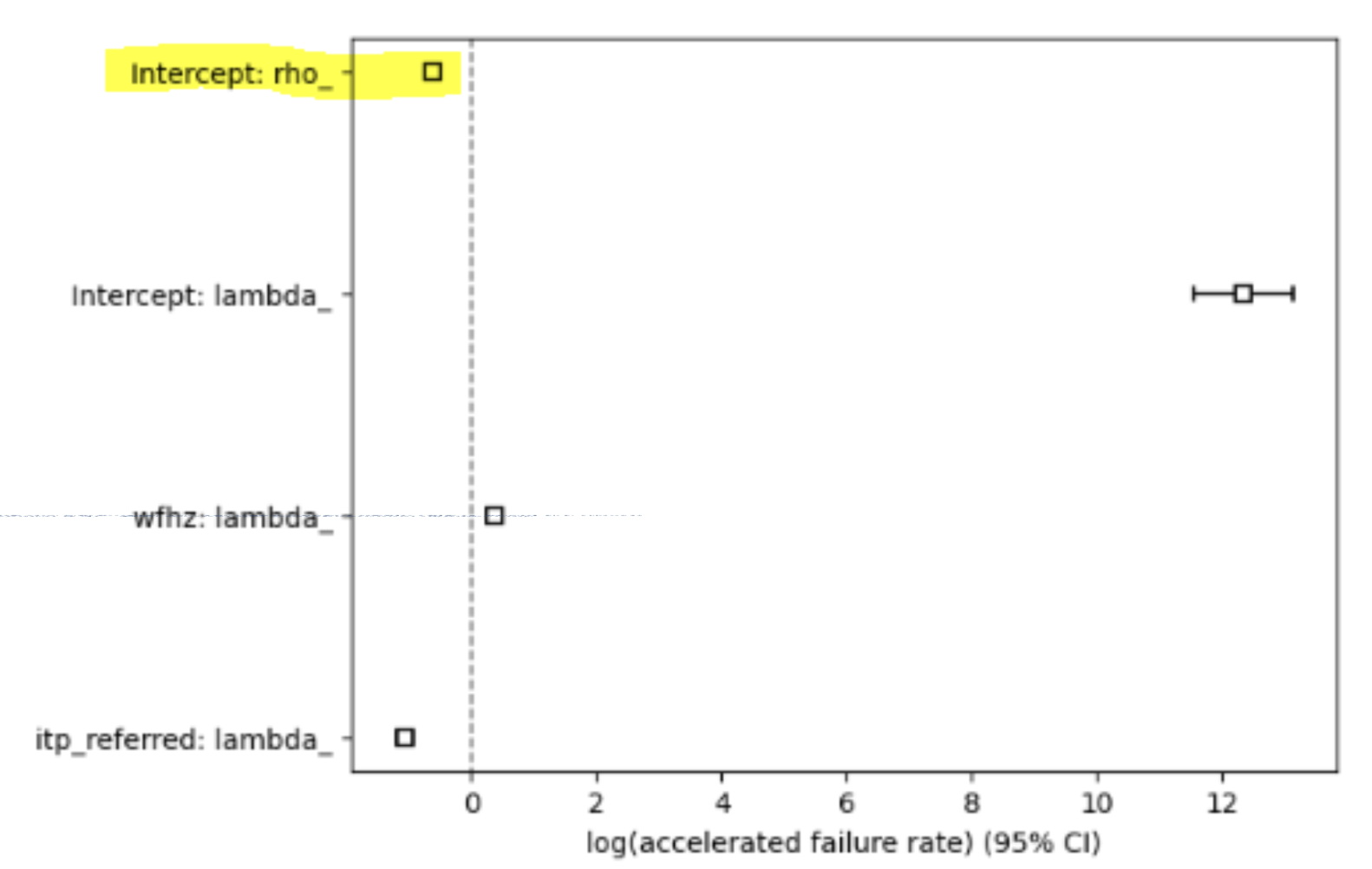
Figure 15 - Weibull parameter values, with rho highlighted
The Weibull function has a parameter for scale/when, lambda, and an important second parameter for shape/rate change, rho. A rho of 1 would mean a constant death/decay rate, the simpler exponential model. For Taimaka patients’ mortality, the baseline decay (i.e., death) rate is not constant over time.
This was proven when fitting a Weibull model to the mortality data and examining if the confidence interval for log(rho) contains 0. It does not and is statistically significantly less than zero at around negative 0.3. (Figure 15.) The rho parameter for Taimaka patient death rate is therefore exp(-0.3), about 0.74. A rho less than 1 means the mortality rate decreases as the patient stays in the program. We needed to reflect this in the survival models and simulations.
We took the feature columns from step 2 and passed those to lifelines. It would regress the feature values against the Weibull AFT model, regularizing the features to select the best few columns out of the dozen. We only needed three columns at most to have the best concordance index, a statistical measure of a survival model's ability to correctly order the time to an event. For example: if two patients are predicted to die in 10 and 100 days, or 100 and 1000 days, the outcome is the same-- the riskier patient is treated first, so we care more about who is the riskier patient, not exactly when they will die. Edema, hospital (ITP) admission and weight for height z-score were the biggest predictors of mortality.
Like the SHAP waterfall data, we took the survival parameters and feature values and encapsulated this data as a JSON SQL database column value for each patient. This eased database handling. The JavaScript client could easily render the JSON data from this table column value. We didn’t have to stand up an application server just to display the lifelines survival graph. (Figure 16.)
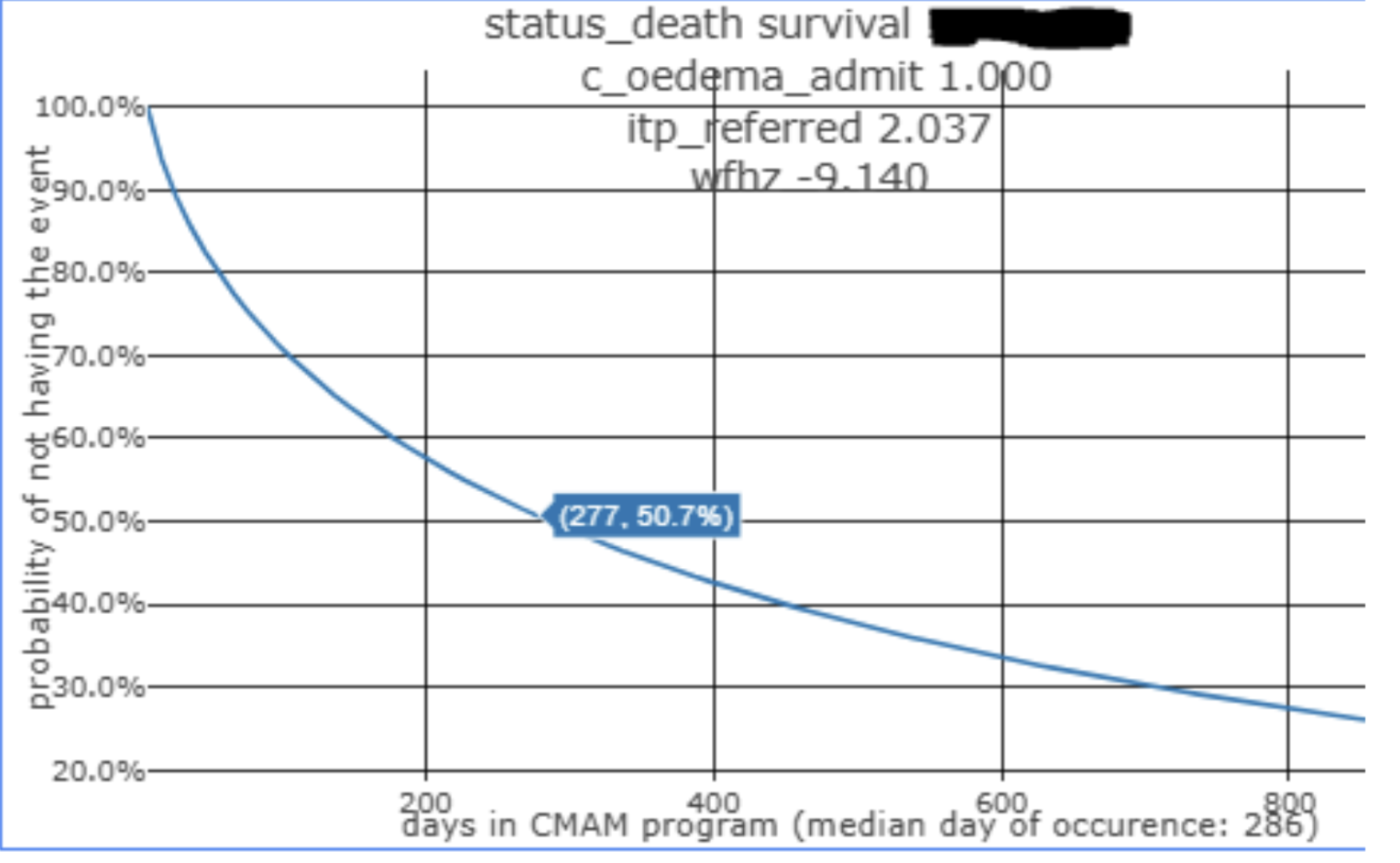
Figure 16 - Survival probability over time for a patient
The Retool graph uses the Plotly JavaScript library to display the 3 factors contributing to a median day of death in 286 days, an admittedly extrapolated value well beyond the average program limit of 90 days but can be used as an indicator of mortality risk.
3. System Architecture & Deployment
The major challenge was that we were limited by a 2-tier architecture, database and web server. Normally, a third tier, application server, would be used to render XAI SHAP explanations, survival curves and ARIMA anthropometric trends.
Form data that the field fills out is in Open Data Kit (ODK). It is processed into a PostgreSQL database which contains other clinical data as well.
Python train.py extracts, transforms and loads (ETL) ODK and SQL historical patient data to Python Pandas DataFrames, generally one per event (Figure 1.) It outputs time series data per event that the appropriate event model is then trained on. It runs approximately once a month so data drift can be monitored and the need for retraining assessed.
Using the output from train.py, models are trained in Google Colab and stored in DigitalOcean storage as serialized AutoGluon tar files. DigitalOcean hosts data and runs Python scripts (purple in figure 17).
Using the trained models from step 2, Python inference, run.py, does the same ETL but for active patients. It formats the patient data to the form seen during model training, passes it through the model and writes the event probabilities as columns to a SQL table, indexed by patient identifier. It runs nightly.
3.1 Probability Types
Three output types were enabled.
Classification Probability. For each classification task event per patient, we took that patient’s event’s SHAP values, combining them with readable column descriptions along with their quantiles and stored the arrays as a single JSON column value for that event for that patient. Therefore, each patient event probability database value had a SHAP JSON database value to explain “chance of” event probability.
Survival Over Time. For “when” probability, we rendered that as a survival curve from a Weibull function. A Weibull AFT model was fit using the best three covariates from the corresponding classification model. The model’s lambda and rho parameters were put into JSON arrays, along with the covariate feature names and the patient feature values. Retool JavaScript calculated the Weibull function values for each patient enrollment day and 30 days into the future. The rendered survival curve matched the lifelines curve that would have been rendered by an application server.
Projected Anthropometric Measurements. For ARIMA forecasting, we packaged up the 6 historical and 30-day forecast anthropometrics by day into a single JSON column, along with the 90% confidence interval for the forecast. An expected recovery trajectory was added via JavaScript.
For all three types, we used the Retool Plotly feature to read the JSON and display it as an interactive chart. When the user hovers the mouse over the chart, Plotly automatically displays text as appropriate, like the full explanation of the feature column for classification SHAP charts or the value for that day in the last 2 output types’ time series lines.
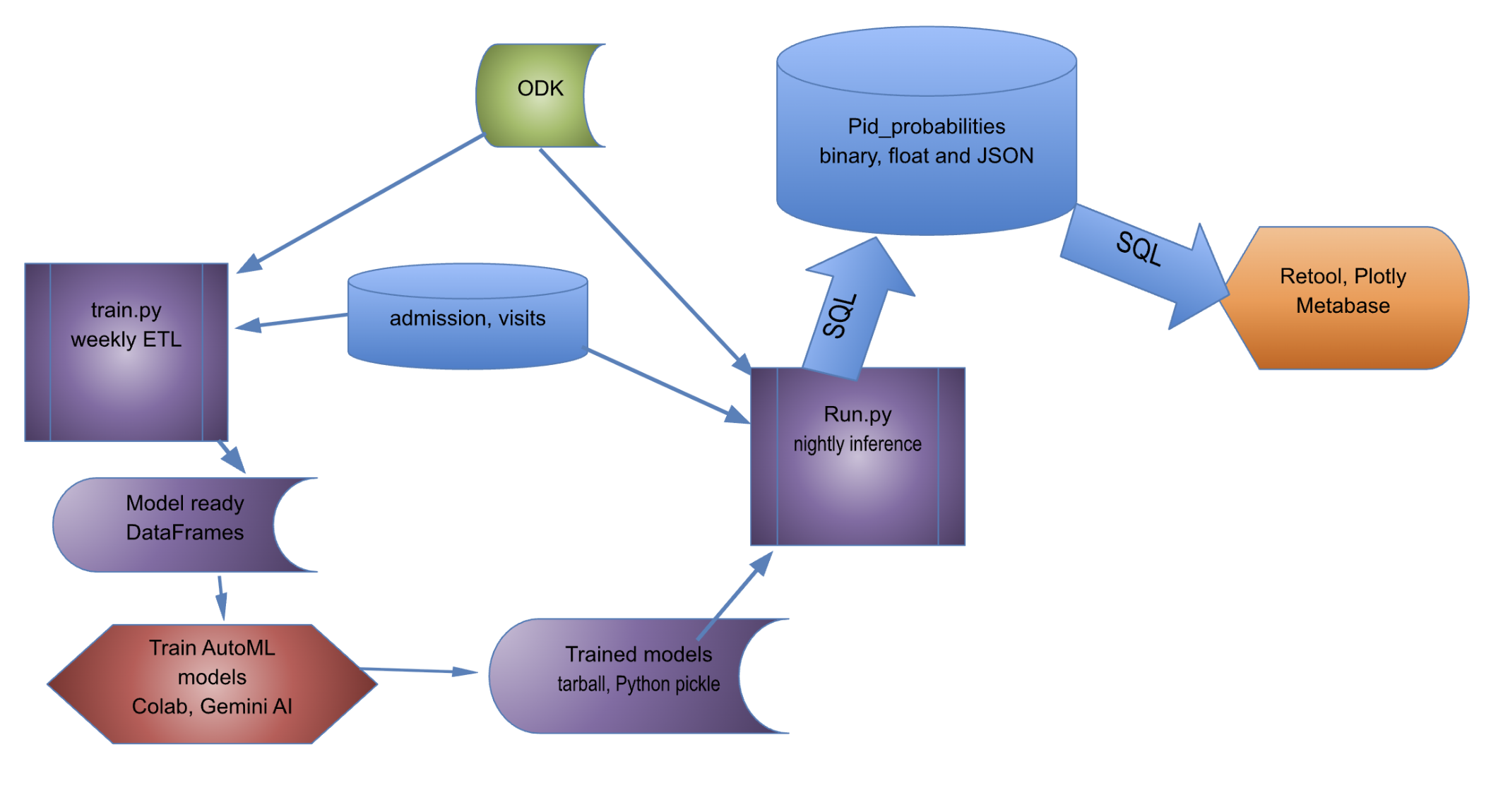
Figure 17 - Systems and data flow